
CRM software for small businesses that keeps every lead moving.
Keep your leads, customer conversations, appointments and follow-up in one organized system. Every account starts with a ready-to-use sales pipeline that you can edit anytime, so you can see which opportunities need attention today and what happens next.
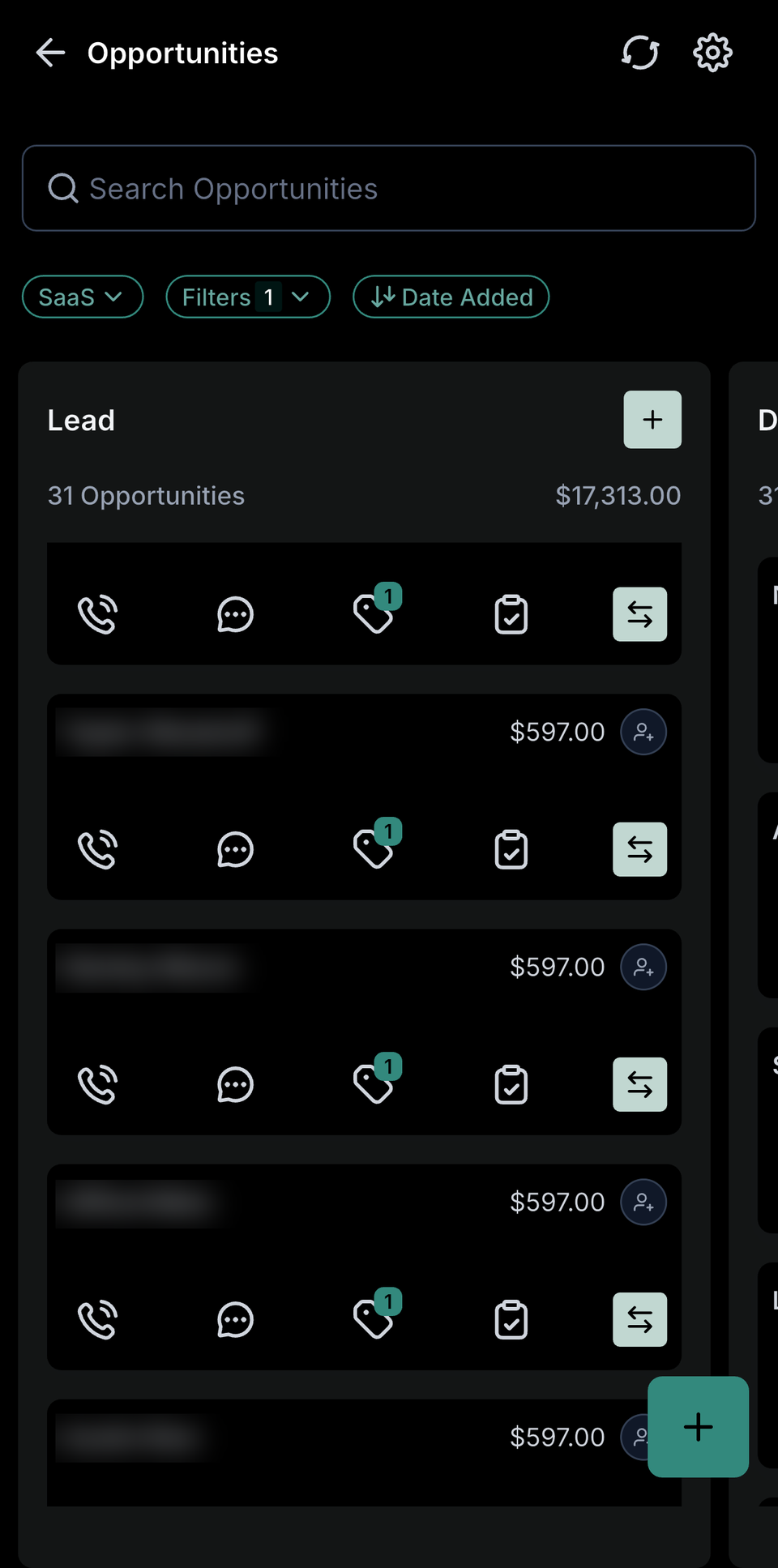
Real Alcreo app pipeline. Contact names hidden.
Most lost deals aren't lost. They're forgotten.
A quote request comes in through the website while you're with a customer. A caller leaves a voicemail asking about pricing. Someone messages your Facebook page on a Sunday. Each one gets written on a sticky note, starred in an inbox, or remembered for a day or two.
Then the week gets busy. Nobody is sure who called back, the quote you sent last Tuesday never gets a follow-up, and a past customer who would have booked again simply hears from a competitor first.
The problem usually isn't effort. It's that the information lives in five places: a phone, an email inbox, a spreadsheet, a calendar and someone's memory. A CRM puts it in one place and shows you what needs to happen next.
One customer record. Every conversation, appointment and payment attached.
Alcreo's CRM is part of a connected system, so the contact record isn't just a name and number. It's the full history of how that person found you and everything that has happened since.
Contact records
Name, phone, email, source, notes, tags, files and every message and call, in one timeline.
Sales pipelines
Drag opportunities from stage to stage and see the dollar value sitting in each one.
Texting and email
Reply to leads by text or email from the same screen, without switching apps. Business texting
Follow-up automation
Reminders for your team and messages for the customer when a deal sits too long. Automations
Pipeline stages that match how you sell
Every account starts with our universal pipeline, so you can start tracking leads on day one. From there, every stage is fully customizable: rename stages, reorder them, add as many as you need, and run separate pipelines for different services or teams. Here are three examples of how businesses adapt it.
Home services
- 1New request
- 2Estimate scheduled
- 3Quote sent
- 4Job booked
- 5Completed & paid
Med spa or clinic
- 1Inquiry
- 2Consult booked
- 3Consult done
- 4Treatment plan sent
- 5Treatment booked
Real estate team
- 1New lead
- 2Contacted
- 3Showing set
- 4Offer / listing
- 5Under contract
- 6Closed
Examples only. Your account starts with the universal pipeline, and you can edit it anytime.
From first contact to paid customer
A lead comes in
A website form, a call, a text, a Facebook or Instagram message, or a booking creates a contact automatically and tags where it came from.
An opportunity opens
The lead lands in the first stage of the right pipeline with an estimated value, so it shows up in your numbers right away.
You work the deal
Call, text or email from the record. Add notes and tasks, and move the card when something changes.
Nothing goes quiet
If a deal sits in a stage too long, the system reminds you or sends a follow-up, depending on how you set it up.
What's inside the CRM
Tasks and reminders
Assign a callback to a teammate with a due date, or set your own reminder to check in after a quote goes out. Tasks sit on the contact, so whoever opens the record sees what's pending.
Custom fields and tags
Track what matters in your business: service type, property size, policy renewal date, treatment interest or budget. Tags make it easy to group people for follow-up and campaigns.
Smart lists
Save filtered views like "quotes over $2,000 with no reply in 7 days" or "customers who haven't booked in 6 months," and work through them one by one.
Calendar and booking
Appointments booked online or by your team attach to the contact and can move the opportunity forward automatically. Scheduling & reminders
Payments on the record
Invoices, estimates and payments through Alcreo Payments show up on the customer's record, so you can see who has paid and who needs a nudge. Payments
Dashboards and the mobile app
See pipeline value, open opportunities and conversion by stage on your desktop, and reply to leads or move deals from the mobile app.
Contact list vs. connected CRM
A spreadsheet or phone contacts app stores who someone is. A connected CRM also tracks where they are in your sales process and what should happen next.
How different businesses use it
Service contractors
Track estimate requests, quotes and booked jobs, and see which quotes need a follow-up call before they go cold.
Insurance agencies
Keep quote requests, renewal dates and cross-sell opportunities on each household or business record.
Clinics and med spas
Move people from inquiry to consultation to treatment, with reminders and rebooking prompts after each visit.
Coaches and consultants
Manage discovery calls, proposals and active clients, with payment status visible on the record.
The software is the easy part. Setup is where most CRMs fail.
Plenty of CRMs are powerful. The common problem is that they arrive empty, and a busy owner never finds the hours to build pipelines, import contacts and connect forms.
Is this the right CRM for you?
A good fit if
You get leads from several places, follow up by phone and text, book appointments or consultations, and want one system your team can share. It suits owner-operators and teams that have outgrown a spreadsheet.
Probably not the right fit if
Your main need is crew dispatch, route planning or job costing. Field-service tools like Jobber or Housecall Pro are built for that. Very large sales teams with complex territory rules may also need an enterprise CRM. Compare Alcreo
What setup involves
An intake call about how you sell, a contact list export (CSV from your current tool or phone), and access to the forms and numbers you want connected. Your account comes with the universal pipeline ready to use, and you can tailor the stages yourself whenever you like.
Questions worth asking any CRM provider
Who sets it up? Can I customize stages myself later? Is texting included or extra? How many users are included? Can I export my data if I leave? (Alcreo: up to 5 users on Launch, unlimited on Growth. If you leave, you get an export of your contacts and your website code.)
CRM questions
Can I customize the pipeline stages?+
Yes. Every account starts with our universal pipeline, and the stages are fully customizable. You can rename, add, remove and reorder stages, and run more than one pipeline, for example one for new customers and one for renewals.
Can I import my existing contacts?+
Yes. We import a CSV export from your current CRM, spreadsheet or phone during setup, with your custom fields mapped where possible.
Do I have to buy a website to use the CRM?+
Our plans include a website, but you can keep the one you have. The price is the same, because we still integrate your site with the CRM. You'd share website access with SEO@alcreomedia.com.
Can my team use it?+
Yes. Team members get their own logins and you can control what each person can see. Launch includes up to 5 users, and Growth includes unlimited users.
Does it work on my phone?+
Yes. The mobile app lets you reply to messages, call leads, check your calendar and move opportunities through your pipeline.
Does it connect to my accounting software?+
Yes. Alcreo connects with QuickBooks, and Alcreo Payments also offers QuickBooks and Xero integration.
How much does it cost?+
The CRM is included in both plans: Launch at $297/month and Growth at $597/month after a one-time setup fee and 30 free days. See pricing
See the CRM in action.
We'll walk you through the pipeline, the inbox and the mobile app, and show you how to make the stages your own.